
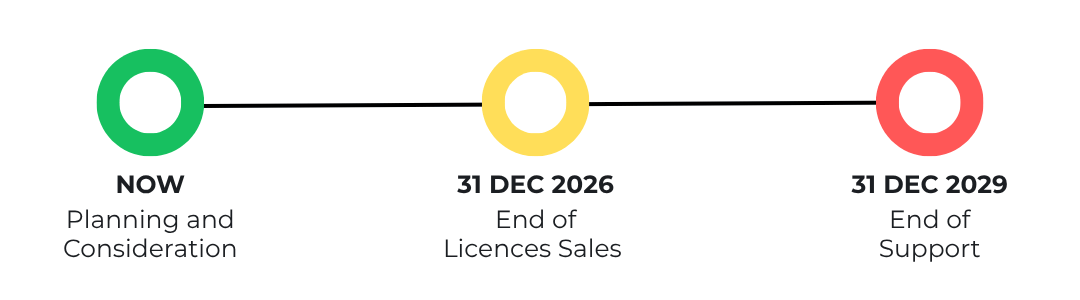
As officially confirmed by Samsung Electronics, MagicINFO On-Premise will reach End of Sale on 31 December 2026 and End of Support on 31 December 2029. Meaning now is the right time to review your migration options and plan your transition accordingly.
For many organisations, moving to MagicINFO Cloud hosted by ScreenCom Group is the most practical way to reduce server management and keep a familiar environment during the remaining support period. Our Migration Team is here to help you assess your current setup, future goals, plan the move properly, and carry out the switch-over with as little disruption as possible.
5 Things to Consider When Moving from MagicINFO On-Premise to MagicINFO Cloud hosted by ScreenCom Group
Before moving from MagicINFO On-Premise to MagicINFO Cloud hosted by ScreenCom Group, it is worth reviewing the practical details first. For your convenience, we’ve prepared a list of the top 5 things to consider in advance:
Your Server Setup
Having MagicINFO On-Premise usually means your team is maintaining the server, database, updates, and day-to-day stability. The costs for all of that quietly stack up.
On the other side, moving to MagicINFO Cloud, hosted by ScreenCom Group, is safer than most on-premise setups since our experts tweak the installation, making it more secure than a standard one.
Moreover, our cloud solution is monitored closely, gets backups multiple times a day, always runs the latest and safest version, which our team first tests before deployment.
Your Timelines
Make sure to plan things accordingly and to keep in mind the key dates:
- MagicINFO On-Premise End of Sale: 31 December 2026
- MagicINFO On-Premise & Cloud End of Support: 31 December 2029
In most cases, this leaves room for a comfortable planning window to ensure the migration goes as smoothly as possible. Our digital signage experts strongly recommend beginning preparations early to limit to a minimum and possible disruptions, especially for large networks. Contact our Migration Team today and discuss the available paths and timelines for your business.
Your Hardware & Network Environment
There are no two digital signage setups alike. Hence, we encourage you to make an inventory of what is being used.
For example, write down the display models, the player setup, the network structure, and any dependencies tied to the current server environment.
Keep in mind that some functions differ between MagicINFO Server and MagicINFO Cloud hosted by ScreenCom Group. This is why we offer a free migration consultation.
Your Content & Data
A proper migration should review what needs to be backed up, moved, and tested.
Our service includes data assessment, planning, and post-migration support, which reflects the need for a structured process rather than a quick but disrupting switch.
Your Long-Term Plan
For some organisations MagicINFO Cloud hosted by ScreenCom Group is the natural, lowest-friction next step. For others, it is the best short- to mid-term route, while alternative platform options like TDM Digital Signage and Samsung’s VXT are being reviewed.
Both digital signage solutions are also powered by ScreenCom Group. The first is an in-house platform, whereas the second is developed by Samsung and distributed by our team. Which is the right option depends entirely on your network’s specifics, internal resources, and operational goals.
Quick and Smooth Migration Process
Moving from MagicINFO On-Premise to MagicINFO Cloud hosted by ScreenCom Group should be structured, not rushed. A typical process looks like this.
Step 1: Contact Our Migration Team
The first step is a practical conversation about your current setup. We review your existing MagicINFO environment, discuss your network size, and identify any obvious technical points that need attention.
Step 2: Assess Your Current and Future Setup (Hardware and Software)
The next important step is to take a moment and assess your current setup. This will allow you to get a better picture of what’s in your network already and if something is missing.
Some things to consider including in your inventory include: the display models, the player setup, the network structure and any dependencies tied to the current server environment.
Step 3: Migration Team Works on a Structured Migration Proposal and a Roadmap
Once the initial information gets to our team, the experts will prepare a structured migration proposal and a roadmap. Those are aligned with your company goals as well as with the MagicINFO On-Premise End of Sale and End of Support dates. This way you can plan your business activities and leave the nitty-gritty to the Migration Team.
Step 4: Execution of Migration
Once the plan is agreed, the migration work starts. This usually includes reviewing the existing setup, preparing the cloud environment, moving the required data, and redirecting screens or devices to the new server environment where needed.
At this stage, our team makes a backup of the on-premise installation. This means that you can continue wherever you left off. No data gets lost, and the setup is identical to what you’re used to.
Step 5: Optimising and Fine-tuning
After the move, the setup should be checked carefully. This includes testing content, playlists, schedules, device connections and day-to-day workflows. The goal is to make sure the cloud environment works as expected in real use.
Step 6: Customer Feedback
The final stage is to review the outcome, confirm any follow-up actions, and make sure your team is comfortable with the new setup. This is also the right point to discuss any longer-term platform planning.
Step 7: Subsequent Tech Support
After the migration is complete, our team remains available to support your MagicINFO Cloud environment. This includes helping with technical questions, providing guidance through support resources, and assisting with post-migration issues through the available support channels.
Frequently Asked Questions About Moving From MagicINFO On-Premise to MagicINFO Cloud hosted by ScreenCom Group
MagicINFO On-Premise is reaching End of Sale on 31 December 2026. This gives organisations a clear planning window to review their current server setup, assess their options, and decide whether moving to MagicINFO Cloud hosted by ScreenCom Group is the right next step.
In many cases, yes. MagicINFO Cloud, hosted by ScreenCom Group, is a cloud-hosted, managed, web-based solution. That makes it a practical option for organisations that want to move away from local server management while keeping a familiar environment.
Moving to MagicINFO Cloud hosted by ScreenCom Group can reduce the need to manage servers, databases, updates, and day-to-day system stability internally. The hosted environment is monitored closely, backed up multiple times a day, and maintained by specialists to provide a safer and more reliable setup.
Before migrating, organisations should review their current hardware, software, network structure, and server dependencies. This includes checking display models, player setups, content structure, and any functions tied to the existing MagicINFO Server environment, as some features may differ when moving to cloud.
A typical migration includes reviewing the existing setup, preparing the cloud environment, backing up the on-premise installation, moving required data, and redirecting displays or devices where needed. Afterward, content, playlists, schedules, device connections and workflows are tested to confirm everything works as expected.
Not always. For some organisations, MagicINFO Cloud hosted by ScreenCom Group is the natural, lowest-friction next step. Others may use it as a short- to mid-term route while reviewing alternative platforms such as TDM Digital Signage or Samsung VXT, depending on their network and operational goals.
Start Planning Your Migration
Early planners have more time to assess their options and avoid last-minute disruption. We'll guide your way and ensure a smooth transition.